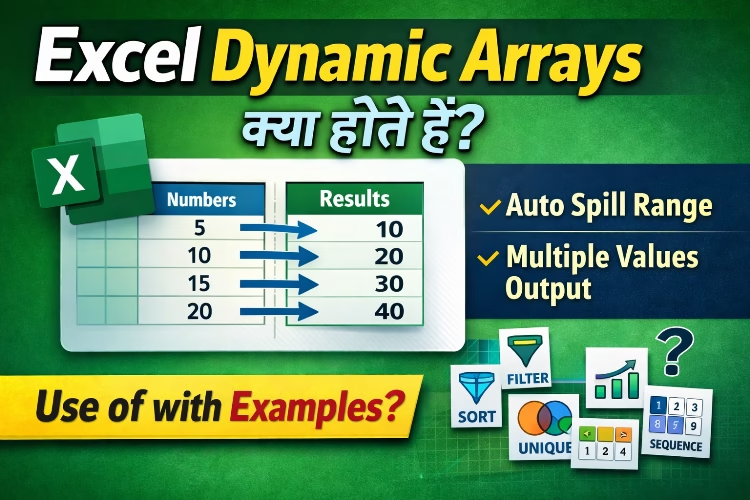
Excel Dynamic Arrays क्या होते हैं?
Microsoft Excel में Dynamic Arrays एक modern feature है जो Excel formulas को ज्यादा powerful और flexible बनाता है। पहले Excel में अगर आपको कई cells में data निकालना होता था, तो आपको formula को अलग-अलग cells में copy करना पड़ता था।
लेकिन Dynamic Arrays की मदद से अब एक ही formula कई cells में automatically result दे सकता है। इसे Spill Feature भी कहा जाता है।
यह feature खास तौर पर Microsoft Excel 365 और Excel के नए versions में उपलब्ध है।
Dynamic Arrays क्या हैं?
Dynamic Arrays ऐसे Excel formulas होते हैं जो एक से ज्यादा values return कर सकते हैं और उनका result automatically कई cells में फैल जाता है।
जब Excel किसी formula का result multiple values में देता है, तो वह result नीचे या बगल के cells में automatically fill हो जाता है। इसे Spill Range कहा जाता है।
Dynamic Arrays का Example
मान लीजिए आपके पास यह data है:
| Numbers |
| 5 |
| 10 |
| 15 |
| 20 |
अगर आप हर number को 2 से multiply करना चाहते हैं तो पहले Excel में आपको हर cell में formula लगाना पड़ता था।
लेकिन Dynamic Array में आप सिर्फ एक formula लिखते हैं:
=A2:A5*2
Result automatically इस तरह फैल जाएगा:
| Result |
| 10 |
| 20 |
| 30 |
| 40 |
Excel automatically बाकी cells में result fill कर देता है।
Dynamic Arrays के Popular Functions
Excel में कई functions Dynamic Arrays के साथ काम करते हैं।
FILTER Function
- यह function data को condition के आधार पर filter करता है।
Example:
=FILTER(A2:B10, B2:B10>5000)
- यह formula उन records को दिखाएगा जिनकी value 5000 से ज्यादा है।
SORT Function
- यह function data को automatically sort करता है।
Example:
=SORT(A2:A10)
- यह data को ascending order में sort कर देगा।
UNIQUE Function
- यह function duplicate values को हटाकर unique values दिखाता है।
Example:
=UNIQUE(A2:A20)
- अगर data में duplicate entries हों, तो यह formula सिर्फ unique list return करेगा।
SEQUENCE Function
- यह function automatic number series generate करता है।
Example:
=SEQUENCE(10)
- यह formula 1 से 10 तक numbers generate करेगा।
RANDARRAY Function
- यह function random numbers generate करता है।
Example:
=RANDARRAY(5,1,10,100,TRUE)
- यह formula 10 से 100 के बीच 5 random numbers generate करेगा।
Spill Error क्या होता है?
कभी-कभी Dynamic Array formula लगाने पर Excel में #SPILL! error दिखाई देता है।
इसके मुख्य कारण हो सकते हैं:
- Spill range में पहले से data मौजूद हो
- Formula के फैलने के लिए space उपलब्ध न हो
- Table structure में limitation हो
- इस समस्या को ठीक करने के लिए आपको spill area खाली करना होगा।
Dynamic Arrays के फायदे
कम formulas में ज्यादा काम
- एक ही formula से कई results मिल जाते हैं।
Automatic updates
- अगर source data बदलता है तो result automatically update हो जाता है।
Advanced data analysis
- Data filtering, sorting और analysis ज्यादा आसान हो जाता है।
Time saving
- Manual formulas copy करने की जरूरत नहीं होती।
Dynamic Arrays का उपयोग कहाँ किया जाता है?
- Data analysis
- Reports और dashboards
- Financial models
- Business data management
- Large datasets processing
निष्कर्ष
Excel Dynamic Arrays Excel के सबसे powerful features में से एक है। इसकी मदद से आप एक ही formula से multiple results generate कर सकते हैं और Excel spreadsheets को ज्यादा efficient बना सकते हैं।
अगर आप Excel में advanced data analysis या automation करना चाहते हैं, तो Dynamic Arrays सीखना बहुत जरूरी है।
FAQ Section
Q1. Excel Dynamic Arrays क्या होते हैं?
Dynamic Arrays ऐसे Excel formulas होते हैं जो multiple values return करते हैं और result automatically कई cells में फैल जाता है।
Q2. Dynamic Arrays किस Excel version में उपलब्ध हैं?
यह feature मुख्य रूप से Microsoft Excel 365 और नए Excel versions में उपलब्ध है।
Q3. Spill Range क्या होता है?
जब Dynamic Array formula का result कई cells में automatically फैलता है, उसे Spill Range कहा जाता है।
Q4. #SPILL error क्यों आता है?
जब formula के result फैलने के लिए जगह नहीं होती या cells में पहले से data होता है, तब #SPILL error दिखाई देता है।