Table of Contents
ToggleBest Free Software for Office, Study and Work
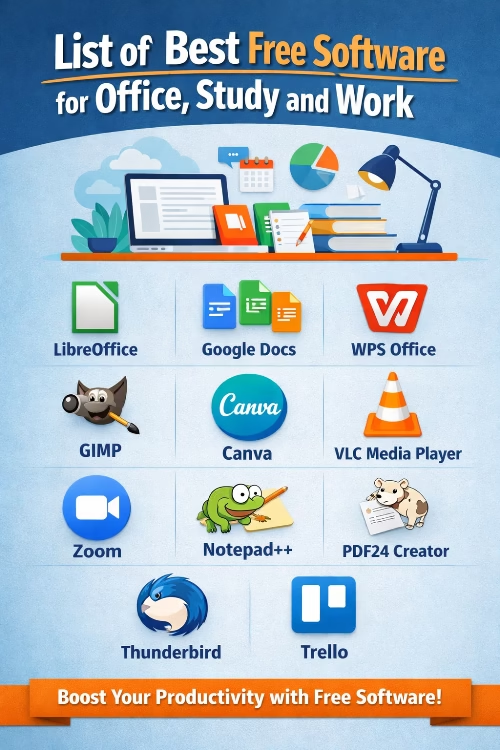
Free software has become an essential part of daily life for students, office employees and professionals. These tools help complete tasks efficiently without spending money on expensive licenses. Below is a carefully selected list of the best free software useful for office work, study and professional needs.
1. LibreOffice
LibreOffice is one of the best free office software suites. It includes Writer, Calc, Impress, Draw and Base. This software is a strong alternative to Microsoft Office and supports all common document formats such as DOCX, XLSX and PPTX.
2. Google Docs, Sheets and Slides
Google Docs, Sheets and Slides are cloud-based office tools that allow users to create, edit and share documents online. These tools are ideal for teamwork and remote work. Files are automatically saved and accessible from any device.
3. Apache OpenOffice
Apache OpenOffice is another popular free office suite. It provides word processing, spreadsheets, presentations and database tools. It is suitable for users who want simple and lightweight office software.
4. WPS Office Free
WPS Office Free offers word processing, spreadsheets and presentation tools with a user-friendly interface. It supports Microsoft Office file formats and is widely used by students and small offices.
5. GIMP
GIMP is a powerful free image editing software. It is useful for designing graphics, editing photos and creating visual content for presentations and projects. GIMP is often considered a free alternative to Adobe Photoshop.
6. Canva (Free Version)
Canva is a web-based design tool used to create presentations, posters, resumes and social media graphics. The free version offers many templates and design elements suitable for students and office users.
7. VLC Media Player
VLC Media Player is a free multimedia player that supports almost all audio and video formats. It is useful for playing training videos, recorded lectures and office media files without needing additional codecs.
8. Zoom (Free Plan)
Zoom is widely used for online meetings, classes and webinars. The free plan allows video meetings with basic features, making it useful for students, teachers and professionals.
9. Notepad++
Notepad++ is a free text and code editor useful for writing notes, editing text files and basic programming. It is lightweight, fast and ideal for students learning coding or office users handling text data.
10. PDF24 Creator
PDF24 Creator is a free PDF tool used to create, merge, split and convert PDF files. It is very helpful for office documentation, assignments and official work.
11. Thunderbird
Mozilla Thunderbird is a free email client that helps manage multiple email accounts in one place. It is suitable for office professionals who handle large volumes of emails daily.
12. Trello (Free Version)
Trello is a task management tool that helps organize work, projects and study schedules. The free version is useful for individual users and small teams.
Conclusion
Free software provides excellent solutions for office work, study and professional tasks without financial burden. These tools improve productivity, support learning and help manage daily work efficiently. By choosing the right free software, users can perform almost all essential tasks without investing in paid applications.
FAQ Section – Free Software for Office, Study and Work
Q1. What is free software?
Free software is software that can be used without paying any cost. It is legally available for download and use for personal, educational or office purposes.
Q2. Is free software safe to use?
Yes, most popular free software like LibreOffice, VLC and GIMP is safe if downloaded from official websites.
Q3. Can free software replace paid office software?
For most users, yes. Free software can handle word processing, spreadsheets, presentations, PDFs and basic design work effectively.
Q4. Which free software is best for students?
LibreOffice, Google Docs, Canva (free version) and VLC Media Player are very useful for students.
Q5. Is free software suitable for office work?
Yes, many offices use free software for documentation, emails, meetings and task management.