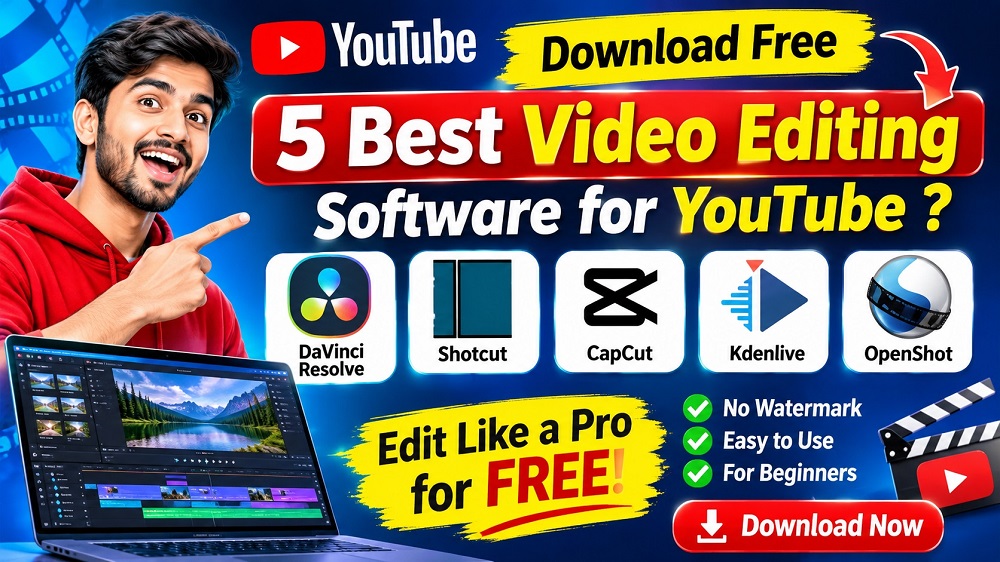
Best Free Video Editing Software for YouTube in 2026
क्या आप YouTube के लिए professional videos बनाना चाहते हैं? यहां जानिए PC और Laptop के लिए 5 Best Free Video Editing Software, उनके features और official download links.
Explore Software ↓
आज के समय में YouTube एक popular content creation platform है। अगर आप अपना YouTube channel शुरू करना चाहते हैं तो आपको video editing की जानकारी होना जरूरी है। अच्छी video editing आपके content को अधिक engaging और professional बनाने में मदद करती है।
Top 5 Best Free Video Editing Software for YouTube
आइए इन पांच popular video editing tools के features, उपयोग और download options जानते हैं।

1. DaVinci Resolve
DaVinci Resolve एक powerful video editing software है। इसमें video editing, color correction, visual effects और audio editing के tools मिलते हैं।
Key Features:- Professional video editing
- Color grading
- Visual effects and transitions
- Audio editing
- Free version supports up to Ultra HD 4K for supported formats
Supported OS: Windows, Mac, Linux
Price: Free version available; Studio is paid.
Official Download ↗
2. Shotcut Video Editor
Shotcut एक free और open-source video editing software है। यह beginners और intermediate users के लिए उपयोगी है।
Key Features:- Multiple video and audio tracks
- Wide format support
- Video filters and transitions
- 4K resolution support
- Audio editing tools
Supported OS: Windows, Mac, Linux
Price: Free
Free Download ↗
3. CapCut Video Editor
CapCut एक popular video editing tool है। इसमें templates, effects, transitions और automatic captions जैसे tools उपलब्ध हैं। कुछ features paid plan में हो सकते हैं।
Key Features:- Easy video editing interface
- Auto captions (feature availability may vary)
- Video effects and filters
- Templates and transitions
- Short-form video editing
Supported OS: Windows, Mac, Android, iOS and Web
Price: Free and paid features
Official Download ↗
4. Kdenlive
Kdenlive एक free open-source video editor है। यह YouTube videos, educational videos और creative projects के लिए अच्छा विकल्प है।
Key Features:- Multiple video and audio tracks
- Transitions and effects
- Color correction
- Title and subtitle tools
- Proxy editing
Supported OS: Windows, Mac, Linux
Price: Free and open source
Free Download ↗5. OpenShot Video Editor
OpenShot beginners के लिए simple और easy-to-use video editing software है। आप इसकी मदद से basic YouTube videos आसानी से edit कर सकते हैं।
Key Features:- Drag and drop editing
- Video transitions
- Title and text effects
- Multiple tracks
- Basic animation and keyframes
Supported OS: Windows, Mac, Linux
Price: Free and open source
Free Download ↗Video Editing Software Comparison Table
| Software | Best For | Platform | Free Version |
|---|---|---|---|
| DaVinci Resolve | Professional Editing | Windows/Mac/Linux | Yes |
| Shotcut | General Editing | Windows/Mac/Linux | Yes |
| CapCut | Shorts and Reels | PC/Mobile/Web | Yes, with limitations |
| Kdenlive | Multi-Track Editing | Windows/Mac/Linux | Yes |
| OpenShot | Beginners | Windows/Mac/Linux | Yes |
YouTube Video Editing Kaise Kare? (Step-by-Step)
अगर आप beginner हैं तो नीचे दिए गए steps को follow करके अपनी पहली YouTube video edit कर सकते हैं।
- Video Import: अपने video clips को editing software में import करें।
- Cut and Trim: Unnecessary parts को remove करें।
- Add Music: Background music और sound effects लगाएं।
- Add Text: Titles, subtitles और captions जोड़ें।
- Transitions: जरूरत के अनुसार transitions और effects लगाएं।
- Color Correction: Video की brightness और colors improve करें।
- Export: YouTube के लिए suitable MP4 video export करें।
Video Editing के लिए Computer Requirements
Professional video editing के लिए आपके computer में अच्छे hardware का होना जरूरी है।
| Component | Suggested Configuration |
|---|---|
| Processor | Intel Core i5 / AMD Ryzen 5 or better |
| RAM | 8 GB basic; 16 GB or more recommended |
| Storage | SSD 512 GB recommended |
| Graphics | Dedicated GPU recommended for demanding projects |
| Display | Full HD Monitor |
Actual requirements depend on the software, operating system, footage resolution and project complexity. Check the official requirements before installing.
Which Video Editing Software Is Best for YouTube?
- Professional YouTube videos: DaVinci Resolve
- Beginners: OpenShot
- Lightweight editing: Shotcut
- Shorts and Reels: CapCut
- Multi-track editing: Kdenlive
Frequently Asked Questions (FAQs)
1. Which is the best free video editing software for YouTube?
DaVinci Resolve is an excellent free professional video editor. OpenShot and Shotcut are also useful free alternatives.
2. Can I edit YouTube videos without a watermark for free?
Yes. DaVinci Resolve, Shotcut, Kdenlive and OpenShot offer free editing without a forced watermark. Check CapCut's export conditions for the effects and templates you use.
3. Which video editing software is best for beginners?
OpenShot is a good starting option because of its simple editing interface. Shotcut is another useful choice.
4. Can I edit YouTube Shorts using free software?
Yes. CapCut, Shotcut and DaVinci Resolve can be used to create vertical videos for YouTube Shorts.
5. Is DaVinci Resolve completely free?
DaVinci Resolve provides a free version with many professional features. DaVinci Resolve Studio is a separate paid version with additional features.
6. Can I learn video editing without any experience?
Yes. Start with basic cutting, trimming, audio, text and transitions. Practice regularly and gradually learn advanced editing techniques.
Conclusion
YouTube video editing सीखने के लिए आपको शुरुआत में expensive software खरीदने की जरूरत नहीं है। DaVinci Resolve, Shotcut, Kdenlive और OpenShot जैसे free tools से आप अपनी editing skills develop कर सकते हैं। अपनी जरूरत, computer configuration और experience के अनुसार software चुनें।
Learn Computer Skills with Excellent Computer Education
क्या आप Video Editing और Digital Skills सीखना चाहते हैं? Excellent Computer Education, Indira Nagar, Lucknow से course information और admission details प्राप्त करें।
Enquire on WhatsApp Visit WebsiteExcellent Computer Education | Indira Nagar, Lucknow
Disclaimer: Software download links are provided for their respective official websites. Software features, system requirements and free-plan conditions may change. Please check the official website before installation.