आज के समय में Artificial Intelligence (AI) ने Excel को पहले से कहीं ज्यादा स्मार्ट और आसान बना दिया है। पहले जहाँ Excel में सही formula बनाने के लिए अच्छी practice और technical knowledge की जरूरत होती थी, वहीं अब AI की मदद से कुछ ही सेकंड में सही formula generate किया जा सकता है।
अगर आपको Excel formulas याद नहीं रहते या complex calculation करने में परेशानी होती है, तो AI tools जैसे Microsoft Excel Copilot, ChatGPT और अन्य AI assistants आपकी मदद कर सकते हैं।
इस लेख में हम समझेंगे कि AI से Excel formula कैसे generate करें और इसका practical example क्या है।
AI से Excel Formula Generate करना क्या होता है?
AI से Excel formula generate करने का मतलब है कि आप simple language में अपनी requirement लिखते हैं और AI आपके लिए सही Excel formula तैयार कर देता है।
उदाहरण के लिए- अगर आप लिखते हैं:
“Excel में A1 से A10 तक के numbers का total निकालने का formula”
तो AI तुरंत formula दे देगा।
Example Formula:
=SUM(A1:A10)
इससे आपका समय बचता है और complex formulas भी आसानी से बन जाते हैं।
AI की मदद से Excel Formula Generate करने के तरीके
ChatGPT का उपयोग करके
आज कई लोग Excel formulas बनाने के लिए ChatGPT का उपयोग करते हैं।
Steps:
- ChatGPT खोलें
- अपनी Excel problem लिखें
- AI से formula generate करवाएं
- उस formula को Excel में apply करें
Example Prompt:
“Excel में IF formula बनाएं अगर marks 40 से ज्यादा हों तो Pass दिखे और कम हों तो Fail”
AI द्वारा दिया गया Formula:
=IF(A1>=40,”Pass”,”Fail”)
Microsoft Excel Copilot का उपयोग
नए version में Microsoft Excel में AI Copilot feature दिया जा रहा है जो natural language से formula बना सकता है।
Example:
आप Excel में लिख सकते हैं:
“Calculate total sales of column B”
Excel खुद formula suggest करेगा।
Generated Formula:
=SUM(B2:B100)
यह feature खासकर beginners के लिए बहुत useful है।
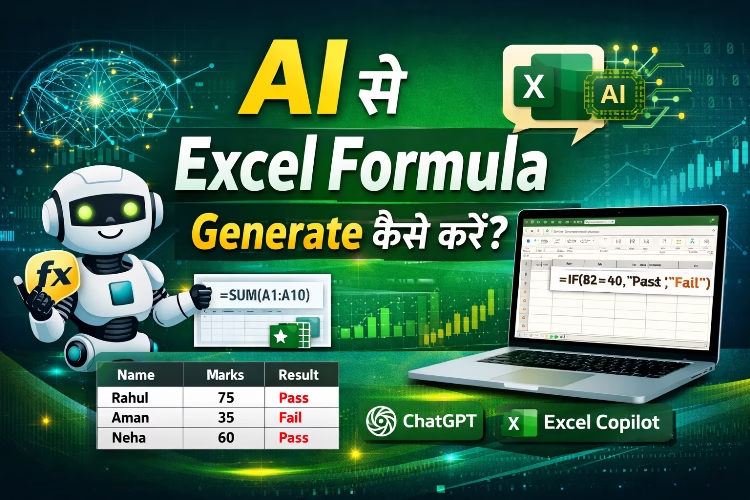
AI से Excel Formula Generate करने का Practical Example
मान लीजिए आपके पास Student Marks की एक sheet है।
| Name | Marks |
| Rahul | 75 |
| Aman | 35 |
| Neha | 60 |
आप चाहते हैं कि Excel automatically बताए कि student Pass है या Fail।
आप AI से पूछ सकते हैं:
“Excel formula to show Pass if marks are greater than 40 otherwise Fail”
AI आपको यह formula देगा:
=IF(B2>=40,”Pass”,”Fail”)
अब इसे Excel में apply करने पर result इस तरह आएगा।
| Name | Marks | Result |
| Rahul | 75 | Pass |
| Aman | 35 | Fail |
| Neha | 60 | Pass |
AI से Excel सीखने के फायदे
- Complex formulas जल्दी बन जाते हैं
- Beginners भी advanced Excel सीख सकते हैं
- Time की बचत होती है
- Data analysis आसान हो जाता है
- Excel automation सीखना आसान हो जाता है
AI tools के कारण Excel अब सिर्फ spreadsheet software नहीं बल्कि powerful data analysis platform बन चुका है।
AI से Excel Formula Generate करते समय ध्यान रखने वाली बातें
- AI prompt clear लिखें
- Column name और data structure सही बताएं
- Formula apply करने से पहले test करें
- Excel version compatible होना चाहिए
अगर prompt सही होगा तो AI बहुत accurate formula देगा।
Conclusion
AI की मदद से Excel formulas बनाना आज के समय में बेहद आसान हो गया है। अब आपको हर formula याद रखने की जरूरत नहीं है। आप simple language में अपनी requirement लिख सकते हैं और AI तुरंत सही Excel formula generate कर देगा।
अगर आप Excel सीख रहे हैं या office work करते हैं, तो AI tools जैसे ChatGPT और **Microsoft Excel Copilot आपकी productivity कई गुना बढ़ा सकते हैं।
FAQ Section
- क्या AI की मदद से Excel formula बनाना संभव है?
हाँ, AI tools की मदद से Excel formulas आसानी से generate किए जा सकते हैं। आप अपनी requirement simple language में लिखते हैं और AI सही formula suggest कर देता है। - Excel formula generate करने के लिए कौन-कौन से AI tools उपयोग किए जा सकते हैं?
Excel formula बनाने के लिए कई AI tools उपलब्ध हैं जैसे ChatGPT और **Microsoft Excel Copilot। ये tools user के prompt के आधार पर formulas तैयार करते हैं। - क्या beginners भी AI की मदद से Excel formulas बना सकते हैं?
हाँ, beginners के लिए AI बहुत helpful है। अगर आपको Excel formulas याद नहीं हैं तब भी आप AI से सही formula generate कर सकते हैं। - क्या AI से complex Excel formulas भी बनाए जा सकते हैं?
हाँ, AI की मदद से VLOOKUP, IF, INDEX, MATCH, Pivot Table और data analysis से जुड़े complex formulas भी generate किए जा सकते हैं। - क्या AI से generate किया गया Excel formula हमेशा सही होता है?
अधिकतर cases में formula सही होता है, लेकिन उसे Excel sheet में apply करने से पहले check और test करना जरूरी होता है। - क्या AI Excel सीखने में मदद कर सकता है?
हाँ, AI tools Excel सीखने के लिए बहुत useful हैं। ये formulas, functions, data analysis और automation समझने में मदद करते हैं।