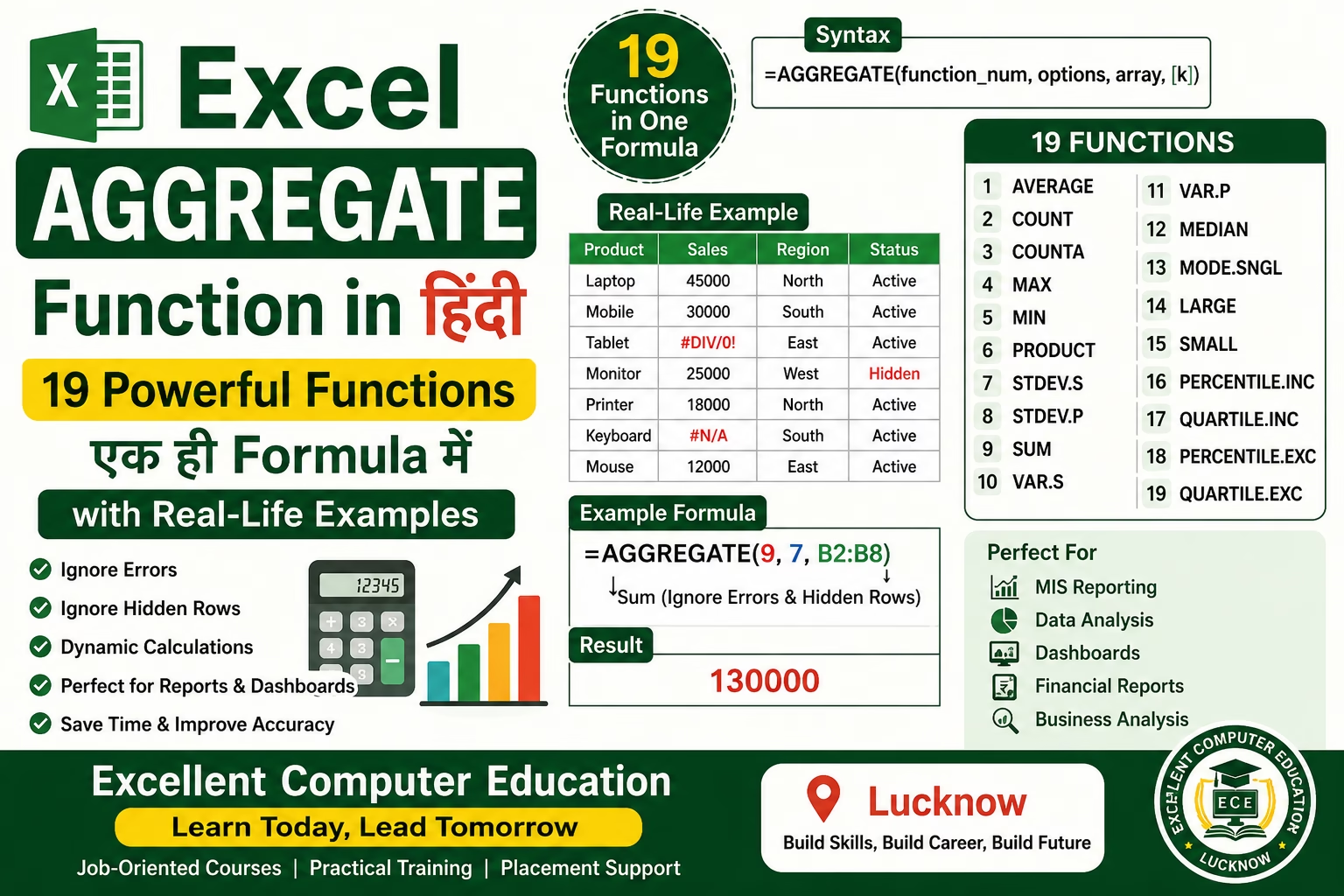
Excel AGGREGATE Function in Hindi
Microsoft Excel में कई ऐसे Functions मौजूद हैं जो बड़े Data को आसानी से Analyze करने में मदद करते हैं। इनमें से AGGREGATE Function एक बेहद शक्तिशाली Function है। यह केवल Sum, Average, Count या Maximum निकालने तक सीमित नहीं है, बल्कि यह 19 अलग-अलग Functions को एक ही Formula के माध्यम से उपयोग करने की सुविधा देता है।
AGGREGATE Function की सबसे बड़ी विशेषता यह है कि यह Hidden Rows, Error Values तथा Nested SUBTOTAL और AGGREGATE Functions को आवश्यकता अनुसार Ignore कर सकता है। यही कारण है कि Data Analysis, MIS Reporting और Dashboard Development में इसका व्यापक उपयोग किया जाता है।
यदि आप Advanced Excel सीख रहे हैं या Data Analyst, MIS Executive अथवा Office Professional बनना चाहते हैं, तो AGGREGATE Function का ज्ञान आपके लिए अत्यंत उपयोगी है।
Excel AGGREGATE Function क्या है?
AGGREGATE एक Advanced Excel Function है जो विभिन्न Mathematical एवं Statistical Calculations को एक ही Function के माध्यम से करने की सुविधा देता है।
इसके द्वारा आप निम्न प्रकार की Calculations कर सकते हैं—
- SUM
- AVERAGE
- COUNT
- COUNTA
- MAX
- MIN
- PRODUCT
- LARGE
- SMALL
- MEDIAN
- MODE
- STDEV
- VAR
- PERCENTILE
- QUARTILE
साथ ही आवश्यकता होने पर यह Error Values और Hidden Rows को Ignore भी कर सकता है।
AGGREGATE Function का Syntax
=AGGREGATE(function_num, options, array, [k])
Arguments
function_num
यह निर्धारित करता है कि कौन-सा Function Execute होगा।
options
यह निर्धारित करता है कि Function किन Values को Ignore करेगा।
array
जिस Range पर Calculation करनी है।
k
LARGE, SMALL, PERCENTILE तथा QUARTILE जैसे Functions के लिए आवश्यक Argument।
AGGREGATE Function के 19 Function Numbers
| Function Number | Function |
| 1 | AVERAGE |
| 2 | COUNT |
| 3 | COUNTA |
| 4 | MAX |
| 5 | MIN |
| 6 | PRODUCT |
| 7 | STDEV.S |
| 8 | STDEV.P |
| 9 | SUM |
| 10 | VAR.S |
| 11 | VAR.P |
| 12 | MEDIAN |
| 13 | MODE.SNGL |
| 14 | LARGE |
| 15 | SMALL |
| 16 | PERCENTILE.INC |
| 17 | QUARTILE.INC |
| 18 | PERCENTILE.EXC |
| 19 | QUARTILE.EXC |
Options Argument का महत्व
AGGREGATE Function का दूसरा Argument सबसे महत्वपूर्ण होता है।
कुछ सामान्य Options—
| Option | कार्य |
| 0 | Hidden Rows और Nested Functions Ignore |
| 1 | Hidden Rows Ignore |
| 2 | Error Values Ignore |
| 3 | Hidden Rows तथा Errors दोनों Ignore |
| 4 | कुछ भी Ignore नहीं |
| 5 | Hidden Rows Ignore |
| 6 | Errors Ignore |
| 7 | Hidden Rows और Errors Ignore |
Example 1 – SUM निकालना
मान लीजिए आपके पास Sales Data है—
| Month | Sales |
| Jan | 15000 |
| Feb | 18000 |
| Mar | 20000 |
| Apr | 17000 |
| May | 25000 |
Formula
=AGGREGATE(9,4,B2:B6)
Result
95000
यहाँ Function Number 9 का अर्थ SUM है।
Example 2 – Average निकालना
Formula
=AGGREGATE(1,4,B2:B6)
Result
19000
Example 3 – Maximum Value
Formula
=AGGREGATE(4,4,B2:B6)
Result
25000
Example 4 – Error Values Ignore करना
यदि किसी Cell में #DIV/0! या #N/A Error हो तो Formula
=AGGREGATE(9,6,B2:B10)
यह SUM निकालते समय सभी Errors को Ignore कर देगा।
Example 5 – LARGE Function
यदि तीसरी सबसे बड़ी Value निकालनी हो
=AGGREGATE(14,4,B2:B10,3)
Result
Third Largest Value
Example 6 – SMALL Function
=AGGREGATE(15,4,B2:B10,2)
यह दूसरी सबसे छोटी Value लौटाएगा।
AGGREGATE Function के Practical Uses
MIS Reporting
Monthly एवं Daily Reports तैयार करने में।
Financial Reports
Sales, Profit एवं Revenue Analysis में।
Dashboard Development
Dynamic KPI और Summary Reports बनाने में।
Inventory Management
Maximum, Minimum तथा Average Stock निकालने में।
HR Reporting
Employee Attendance एवं Performance Reports तैयार करने में।
Data Cleaning
Error Values को Ignore करके Accurate Reports तैयार करने में।
Difference between AGGREGATE and SUBTOTAL
| Feature | AGGREGATE | SUBTOTAL |
| Functions | 19 | 11 |
| Ignore Errors | हाँ | नहीं |
| Hidden Rows | हाँ | हाँ |
| LARGE/SMALL Support | हाँ | नहीं |
| Advanced Analysis | हाँ | सीमित |
यदि आपका Data जटिल है या उसमें Errors मौजूद हैं, तो AGGREGATE अधिक उपयोगी विकल्प है।
AGGREGATE Function के लाभ
- एक ही Function में 19 Calculations
- Error Values Ignore करने की सुविधा
- Hidden Rows को Ignore कर सकता है
- Dynamic Reports के लिए उपयुक्त
- Dashboard Development में उपयोगी
- Large Data Sets पर बेहतर प्रदर्शन
- Financial एवं Business Reporting के लिए आदर्श
सामान्य गलतियाँ
- गलत Function Number का उपयोग
- Option Number सही न चुनना
- LARGE एवं SMALL में k Argument भूल जाना
- गलत Data Range चुनना
- Array में Text Values होने पर अपेक्षित परिणाम न मिलना
Interview Questions
AGGREGATE Function क्या है?
यह एक Advanced Excel Function है जो 19 अलग-अलग Statistical और Mathematical Functions को एक ही Formula में उपलब्ध कराता है।
AGGREGATE और SUBTOTAL में क्या अंतर है?
AGGREGATE Error Values को Ignore कर सकता है और अधिक Functions प्रदान करता है।
कौन-सा Option Error Values Ignore करता है?
Option 6 तथा Option 7।
LARGE Function के लिए कौन-सा Function Number प्रयोग होता है?
Function Number 14।
SUM के लिए कौन-सा Function Number उपयोग किया जाता है?
Function Number 9।
निष्कर्ष
यदि आप Excel में Professional Reporting, Dashboard Development या Data Analysis करते हैं, तो AGGREGATE Function आपके लिए अत्यंत उपयोगी है। इसकी सबसे बड़ी विशेषता यह है कि यह कई अलग-अलग Functions को एक ही Formula में उपलब्ध कराता है और आवश्यकता अनुसार Hidden Rows तथा Error Values को Ignore करके अधिक विश्वसनीय परिणाम देता है।
Advanced Excel सीखने वाले प्रत्येक विद्यार्थी, MIS Executive, Accountant और Data Analyst को AGGREGATE Function का अभ्यास अवश्य करना चाहिए। इसके नियमित उपयोग से आपकी Reporting तेज़, अधिक सटीक और Professional बन जाती है।