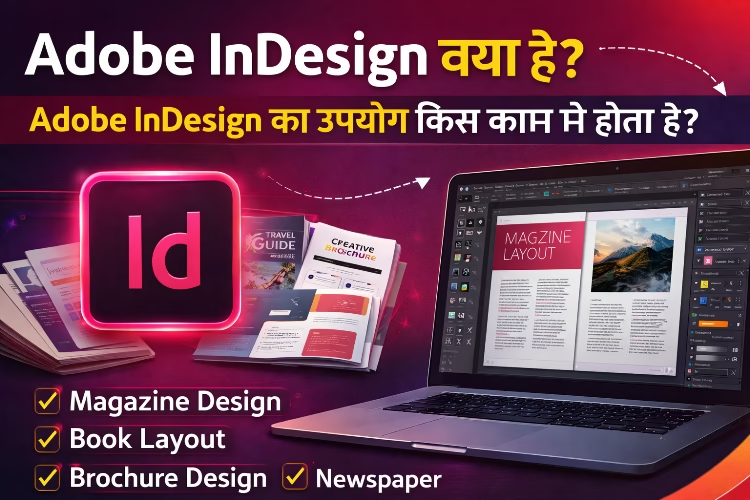
Adobe InDesign क्या है?
आज के समय में Publishing, Graphic Design और Print Media में professional layout design की बहुत demand है। Magazine, Newspaper, Books, Brochure और Catalog जैसे documents बनाने के लिए designers एक powerful software का उपयोग करते हैं जिसका नाम Adobe InDesign है।
Adobe InDesign एक professional desktop publishing software है जिसे publishing industry में widely use किया जाता है। यह software खासतौर पर page layout design और print publishing के लिए बनाया गया है।
इस लेख में हम विस्तार से जानेंगे कि Adobe InDesign क्या है, इसके मुख्य features क्या हैं और इसका उपयोग किन-किन कामों में किया जाता है।
Adobe InDesign क्या है?
Adobe InDesign एक professional desktop publishing software है जिसे Adobe Systems ने develop किया है। इस software का उपयोग mainly multi-page documents और professional layout design बनाने के लिए किया जाता है।
यह software designers को text और images को व्यवस्थित तरीके से arrange करने की सुविधा देता है ताकि attractive और professional layout तैयार किया जा सके।
Publishing industry में Magazine, Newspaper, Books और Marketing Materials बनाने के लिए Adobe InDesign सबसे ज्यादा उपयोग किया जाने वाला software है।
Adobe InDesign में designers typography, images, graphics और layouts को आसानी से manage कर सकते हैं और high quality print ready documents तैयार कर सकते हैं।
Adobe InDesign का इतिहास
Adobe InDesign को सबसे पहले 1999 में launch किया गया था। उस समय publishing industry में QuarkXPress software ज्यादा लोकप्रिय था। लेकिन धीरे-धीरे Adobe InDesign ने advanced features और Adobe Creative Cloud integration के कारण market में अपनी मजबूत जगह बना ली।
आज Adobe InDesign publishing और layout design के लिए सबसे popular software में से एक है।
Adobe InDesign के मुख्य Features
- Professional Page Layout
Adobe InDesign में multi-page documents को design करना बहुत आसान होता है। इसमें pages को organize करने के लिए advanced layout tools मिलते हैं।
- Advanced Typography
इस software में typography के लिए powerful tools मिलते हैं जिससे text formatting, paragraph style और character style आसानी से manage किए जा सकते हैं।
- Master Pages
Master pages feature की मदद से designer एक बार layout design बनाकर उसे पूरे document में apply कर सकता है। इससे large documents को manage करना आसान हो जाता है।
Image Placement
Adobe InDesign में images को easily place और resize किया जा सकता है। इसमें high quality images के साथ काम करने के लिए professional tools उपलब्ध हैं।
Print Ready Output
इस software में designers print industry के लिए high quality PDF files export कर सकते हैं।
Adobe InDesign का उपयोग किस काम में होता है?
Adobe InDesign का उपयोग publishing और design industry में कई प्रकार के कामों के लिए किया जाता है।
Magazine Design
Magazine design करने के लिए Adobe InDesign सबसे popular software है। इसमें multiple pages को attractive layout में design किया जा सकता है।
Book Layout Design
Book publishing companies book layout design करने के लिए Adobe InDesign का उपयोग करती हैं। इसमें chapters, headings और page numbering को आसानी से manage किया जा सकता है।
Newspaper Design
Newspaper publishing में page layout और text formatting के लिए Adobe InDesign का उपयोग किया जाता है।
Brochure Design
Marketing brochures और promotional materials design करने के लिए भी यह software उपयोग किया जाता है।
- Catalog Design
Companies अपने products का catalog design करने के लिए Adobe InDesign का उपयोग करती हैं।
- Flyer और Poster Design
Advertising और promotion के लिए flyer और poster design करने में भी Adobe InDesign मदद करता है।
Adobe InDesign और Graphic Design
Graphic design industry में Adobe InDesign एक महत्वपूर्ण software है। हालांकि logo design और illustration के लिए designers आमतौर पर Adobe Illustrator का उपयोग करते हैं, जबकि photo editing के लिए Adobe Photoshop ज्यादा उपयोग किया जाता है।
लेकिन जब किसी project में multi-page layout design बनाना होता है, तब Adobe InDesign सबसे अच्छा विकल्प माना जाता है।
Adobe InDesign सीखने के फायदे
Adobe InDesign सीखने से कई professional opportunities मिल सकती हैं।
- पहला फायदा यह है कि publishing industry में इसकी बहुत demand है। Magazine, Newspaper और Book Publishing companies हमेशा skilled designers की तलाश में रहती हैं।
- दूसरा फायदा यह है कि marketing agencies और advertising companies भी brochure और catalog design के लिए Adobe InDesign experts को hire करती हैं।
- तीसरा फायदा freelancing opportunities हैं। Adobe InDesign सीखकर designer online platforms पर clients के लिए layout design projects कर सकता है।
Adobe InDesign सीखने के लिए क्या जरूरी है?
Adobe InDesign सीखने के लिए basic computer knowledge होना जरूरी है। इसके अलावा design concepts की basic understanding भी helpful होती है।
अगर किसी student को graphic design में interest है, तो वह आसानी से Adobe InDesign सीख सकता है।
Regular practice और real projects पर काम करने से इस software को जल्दी सीखा जा सकता है।
Conclusion
Adobe InDesign publishing और layout design के लिए एक powerful और professional software है। Magazine, Books, Newspaper, Brochure और Catalog जैसे documents बनाने के लिए इसका व्यापक उपयोग किया जाता है।
अगर आप publishing industry या graphic design field में career बनाना चाहते हैं, तो Adobe InDesign सीखना आपके लिए बहुत फायदेमंद हो सकता है।
यह software designers को professional level layout design बनाने में मदद करता है और उन्हें creative career opportunities प्रदान करता है।
FAQ Section
1. Adobe InDesign क्या है?
Adobe InDesign एक professional desktop publishing software है जिसका उपयोग magazine, books, brochure, catalog और multi-page layout design बनाने के लिए किया जाता है।
2. Adobe InDesign का उपयोग किस काम में होता है?
Adobe InDesign का उपयोग magazine design, book layout, newspaper design, brochure design, flyer, catalog और marketing materials बनाने के लिए किया जाता है।
3. क्या Adobe InDesign graphic design के लिए उपयोग किया जाता है?
हाँ, Adobe InDesign graphic design में विशेष रूप से page layout design और publishing projects के लिए उपयोग किया जाता है।
4. Adobe InDesign और Adobe Illustrator में क्या अंतर है?
Adobe Illustrator का उपयोग logo, vector graphics और illustration बनाने के लिए किया जाता है, जबकि Adobe InDesign का उपयोग multi-page layout design जैसे magazine और books बनाने के लिए किया जाता है।
5. क्या Adobe InDesign सीखना मुश्किल है?
नहीं, अगर आपको basic computer knowledge और design में interest है तो आप practice के साथ Adobe InDesign आसानी से सीख सकते हैं।
6. Adobe InDesign सीखने के बाद कौन-कौन सी jobs मिल सकती हैं?
Adobe InDesign सीखने के बाद आप Graphic Designer, Layout Designer, Publishing Designer, Brochure Designer या Freelance Designer के रूप में काम कर सकते हैं।